How to think about building AI systems for your business
Start with what your business needs to happen, learn each piece when you need it, and get one system working before you touch the next.
Most people build AI systems backwards. They find a new tool, get excited about everything it can do, and go looking for places to use it. Start with your business instead. Sort it into sales and marketing, operations and delivery, work backwards from what each one needs, write the steps down, and then ask AI how to build it. Learn each skill when you need it, not before.
I built a set of AI systems for EveryExpert over the last few months. One live session now turns into a replay, a recap, an email, short videos, articles and a community post. None of it started with a tool. It started with a list of things the business needed to happen every week.
This article is about how to think about it. If you want to see how I built each one, the videos are free, and the link is near the end.
Why most people start in the wrong place
Here's the pattern I see over and over. Someone finds a new tool. They think about all the things it can do. Then they spend weeks building around it, connecting it to one app, then another, adding one prompt, then another, and watching one more video or buying one more course on the latest thing.
A month later they have a lot of setup and not much that moved the business.
The better first question is simple: what do I want to happen in the first place? Once you know that, the tool is just the way you get there.
Sort your business into three buckets
Every business I've worked with fits into three buckets:
Sales and marketing. How people find you and decide to buy.
Operations. How the work gets organized, scheduled and tracked.
Delivery. How the client gets what they paid for.
For each bucket, ask what has to happen for it to work. Then keep asking until you hit the first step.
Here's what that looks like for sales. For sales to happen, you need your social content ready. For your content to be ready, you need a calendar. For a calendar, you need to know what you want to say. To know what to say, you need to be clear on who you are, who you help and what your brand stands for.
Now you have a chain. Each link is a possible system, and you know the order to build them in. You also know why you're building each one, which matters when it gets hard.
What Adobe taught me about tools that can do everything
Years ago I worked at Adobe as a systems integrator and business consultant. I helped companies use the Adobe Marketing Suite across their digital marketing channels to get more out of their spend: testing different images, different copy, different combinations across platforms.
It's a huge platform. It can handle every channel. It can even pick which image to show a specific person based on the last image they looked at on your website.
People would ask me how to use it. My answer was always the same. There are endless use cases, so you have to walk in with a business use case. If you don't, you get lost.
AI tools are the same. They can do almost anything, which is exactly why you need to show up knowing what you want them to do.
Write the process down before you build
Once you have a use case, document it. Write down every step you take today, in order, the way you'd explain it to a new hire.
It's boring. Do it anyway. This is where you go slow so you can go fast later. If you document it the right way, you never have to figure it out again, and anyone (or anything) can follow it.
Then take that document to AI and ask: "Here's what I do and the steps I follow. How can I use you to do this?" It will help you figure out what to build, and it will be working from your process instead of guessing.
Learn it when you need it
The second habit is just-in-time learning. Don't try to learn AI in advance. Learn the skill when you hit a use case that needs it.
Once you know exactly what you're trying to do, a YouTube video is usually enough. I've never paid for a single AI course. The only thing I've paid for is AI for Non-Techies, a community run by Brock Mesarich, and I joined because I liked his YouTube videos so much I wanted to say thanks.
And you can always ask the AI itself. Once you understand the use case, ask it how it can help you do that specific thing. That's a much better question than "what can you do?"
I wrote more about this in Learn it when you need it.
Where your systems end up
Two choices decide most of what happens: where you start, and how many things you build at once.
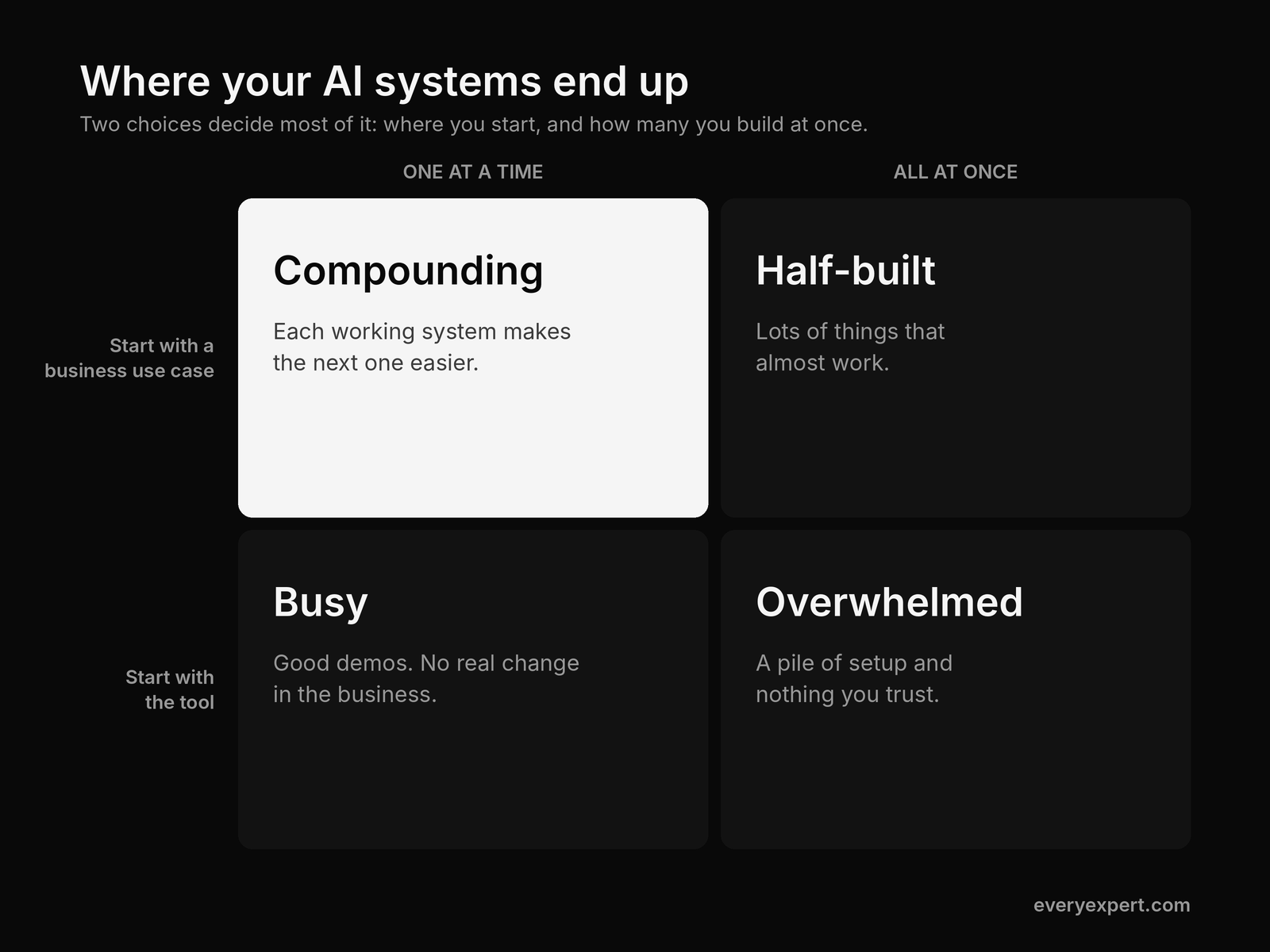
Start with the tool, build everything at once: you're overwhelmed, with a pile of setup and nothing you trust.
Start with the tool, one at a time: you stay busy. Good demos, no real change in the business.
Start with the use case, build everything at once: you end up with a lot of things that almost work.
Start with the use case, one at a time: this is where it compounds. Each working system makes the next one easier.
The three places you'll get stuck
1. The first-week fear. A lot of people freeze at the start because they think they're not techie enough. When I started, I would screenshot whatever was on my screen and ask, "Tell me what to do from here, step by step." You don't have to work that way now, but you can. Tell the AI you're a beginner and ask it to explain things at your level. It will.
2. Too many half-built systems. The temptation is to overhaul everything at once. Don't. You can never get enough of something that almost works. Pick one use case, make it work very well, turn it into a repeatable skill or set of instructions, and then move on. If you're not sure what "working" looks like, ask the AI to find case studies and forum threads from people who already built it. Reverse-engineer what worked for them.
3. Systems that stop getting better. Once something works, it's easy to leave it alone forever. Instead, once a week, look at how you're using AI across sales and marketing, operations and delivery, and ask four questions: what should I stop, start, continue and change? When something isn't working, ask one more: is this hard, or is this wrong? Hard means keep going. Wrong means stop. Let the results settle it, not how you feel about it.
Put it together
Look at your business in three buckets. Find the use cases that already exist inside each one by working backwards from what has to happen. Write the steps down. Learn what you need, when you need it. Get one system working well before you start the next, and review all of it every week.
Watch me build them
I walk through each of my systems in free videos on the EveryExpert YouTube channel, including what went in, what came out, and what broke along the way: https://www.youtube.com/@EveryExpertApp
Talk it through with me live
I'm going through this process live on Thursday, November 12, at noon ET, and you can bring your own use case. It's free: https://www.everyexpert.com/events/accelerator
Your homework
Pick one bucket: sales and marketing, operations or delivery. Write down the result you want, then work backwards, one link at a time, until you hit the first step. Circle the step you repeat most often and write out how you do it today, step by step.
Then paste it into your AI tool and ask, "How can I use you to do this?" Twenty minutes, and you'll have your first real use case.Where to go next
Where to go next
Not on EveryExpert yet? It's where people book paid calls with experts like you, and it's free to set up. Sign up here.
Already on EveryExpert? Here's how to book more calls: How to get started on EveryExpert and book your first paid call.
Questions about building AI systems for your business, or building standards for your life? Book a call with me on EveryExpert.