How to get started on EveryExpert and book your first paid call
The four moves from a blank page to your first paid booking, with a longer article for each step.
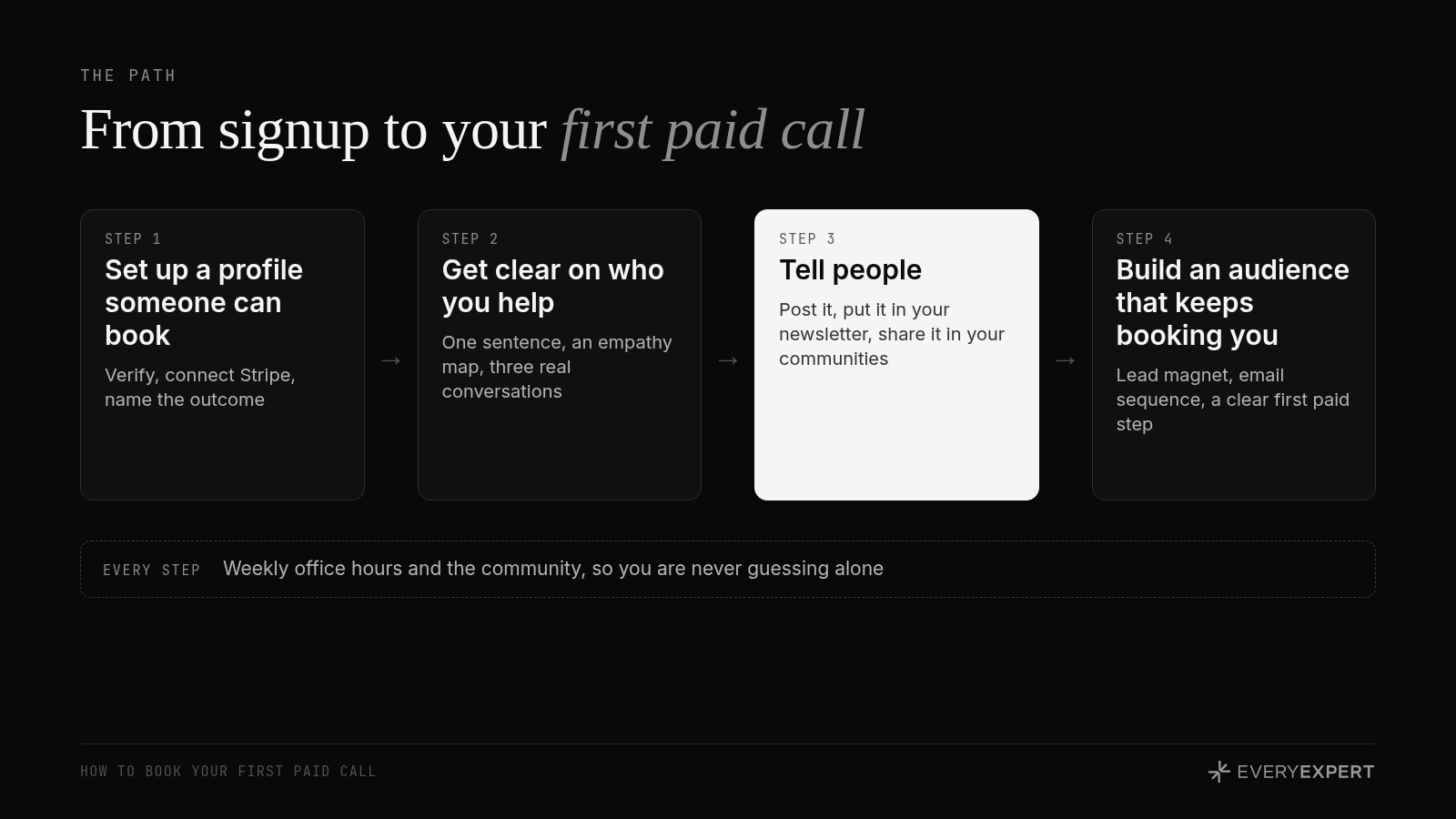
EveryExpert gives you one page where people can book and pay you for a live call or an async question, and it handles the scheduling, the payment and the recap for you. Getting your first paid call comes down to four moves: set up a clear profile, get specific about who you help, tell people, then build an audience that keeps booking you.
This is the guide I wish every new expert read on day one. It covers what EveryExpert is, who it's built for, exactly what to do next, and how to book your first paid call. Each section links to a longer article when you want the full version.
Read it top to bottom once. After that, jump to whichever step you're stuck on.
What EveryExpert is
EveryExpert is a place to get paid for what you know. You claim a page, list what people can book you for, and set a price. Someone clicks your link, picks a time, and pays before the call starts.
It comes from the makers of Kajabi, where experts have earned over $11 billion. Setup takes about ten minutes, it's free, and there's no monthly fee. EveryExpert only makes money when you do, through a small fee on each booking.
What makes it different from a calendar link is everything that happens around the call. The booking and payment happen in one step. The session runs on built-in video. Afterward, your client gets a recording, an AI-generated summary with key topics and action items, and a full transcript. And you can sell async questions, where someone sends you a question and you answer when it suits you.
Full breakdown, including what to do with the recap after every call: Why EveryExpert
Who it's built for
EveryExpert is built for people with real expertise who want an easy way to get paid for it. Consultants, advisors, authors, speakers, trainers, operators with fifteen years in one industry. People who get asked "can I pick your brain?" and would like that to turn into a booking.
If coaching is already your full-time business, and you have your intake, scheduling, payments and follow-up dialed in, you may not need it for your existing clients. That's fine. Plenty of full-time coaches still use EveryExpert as the front door: a small, clearly named call that new people can book without a sales conversation. If you're looking for a full home for your coaching business, that's what Kajabi is for. It runs coaching programs alongside courses and community, all in one place, from the same team behind EveryExpert.
The sweet spot is the expert who knows a lot, gets asked a lot, and hasn't made it easy for anyone to pay them.
The community comes with it
Most people sign up for the link. The part that actually moves them is the room.
When you join EveryExpert, you're joining a community of experts working on the same problem you are: getting booked. There's a Slack community where I post practical plays you can run the same day, each with one small challenge. I run office hours every week, where we work through real profiles, offers and posts live. There are workshops, spotlights that put members in front of the wider EveryExpert audience, and the Expert Accelerator, free live lessons on booking paid calls that anyone can join: https://www.everyexpert.com/events/accelerator
You don't have to figure this out alone, and you shouldn't. Full rundown: The part most people skip: the EveryExpert community
Your path to the first paid call
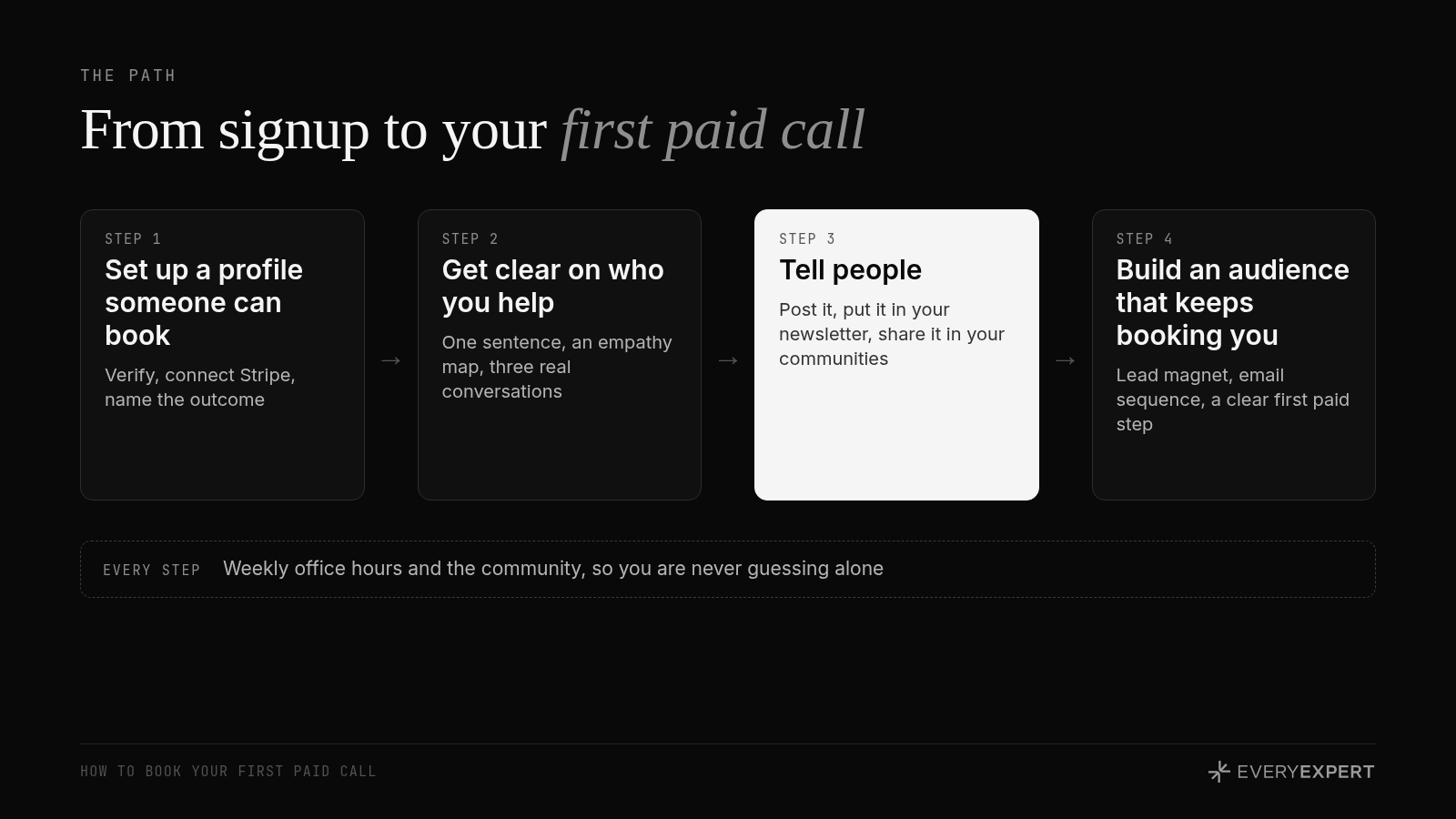
Step 1. Set up a profile someone can actually book
A profile gets booked when a stranger can tell, in five seconds, who you help, what problem you solve and what they'll walk away with. Most profiles fail on the first line.
The short version: sign up, verify your identity, connect Stripe, rename the default session to something specific, add a short description with example questions, set a real price, and check your booking page in a private browser window before you share it.
Full walkthrough: How to set up your EveryExpert profile in ten minutes
Step 2. Get uncomfortably clear on who you help
Everything gets easier once you know exactly who you're talking to. Your session title, your description, your posts, your price. Most experts are guessing, and a guess that's a few degrees off is the difference between "that's exactly my problem" and scrolling past.
The fix takes an afternoon: write your audience in one specific sentence, build an empathy map of what they say, think, do and feel, and use AI to check what they're actually posting about right now. Then confirm it with three real conversations.
Full walkthrough: Know exactly who you help before you write a word
Step 3. Tell people
Your first bookings come from the people who already know you, and anyone can do this, whatever the size of your following. Post about the problem you solve with your booking link. Put it in your newsletter, then keep a one-line PS about it in every issue. Share it in the communities you're already part of. Put the link everywhere people land when they reach out to you.
That's it. The first time I added a single PS line about a call to my newsletter, two people booked the next day.
Full walkthrough: Tell people you take calls now
Step 4. Build an audience that keeps booking you
Telling people gets your first calls. To keep them coming, build a simple system: a lead magnet that solves one narrow problem, a short email sequence, and EveryExpert as the first paid step on your ladder. Discovery calls run better here too, because your client gets the recap and already knows how to book you when it's time for the bigger work.
Full walkthrough: Build an audience that keeps booking you
After your first call
When the call ends, EveryExpert sends your client a recap with a summary of what you covered and clear next steps. You get the same recap.
Don't file it away. Read it and look for other ways you could help this person: the next problem they mentioned, the thing they'll need once this one is solved, the bigger project behind the question they booked you for. That's how one call turns into a second call, a package or a bigger engagement. It's how each client becomes worth more to you over time, without finding a single new person.
The first booking also gives you three more things, and each one makes the next booking easier.
A review. Reviews only open up after a completed session, and a profile with zero reviews shows no rating at all. Ask for it on the call, before you hang up: "Would you feel comfortable leaving a review?" It is far easier to ask in the moment than by email a week later.
If you're starting from zero, the easiest first review comes from someone who already knows your work, like a past colleague or a former coworker. Ask them to book a real session on something they actually want help with, and to leave an honest review if it helped.
A better offer. The questions your client asked are the questions your next client will have. Put them in your description.
Proof to share. With permission, a line from the review or the result of the call is your next post.
Once you have a few reviews, revisit your price.
Your homework
Answer this in one sentence: who do you help, with what problem, so they walk away with what result?
Use this shape: "I help [specific person] solve [specific problem] so they leave with [specific result]." Ten minutes. If you can't get it into one sentence, that's useful. It's probably the same reason your profile isn't converting yet.
Bring it back
Post your sentence in #best-practices and I'll help you tighten it. If you want to work on it live, bring it to office hours and say "here's my one sentence, here's who I think it's for, tell me what's unclear." Put that way, the room can help you fast.
Next session: sign up for the next free live lesson at https://www.everyexpert.com/events/accelerator
The full series
Read in this order the first time:
Not on EveryExpert yet?
EveryExpert is where people book paid calls with experts like you. Join at https://www.everyexpert.com/get-started. It's free to set up, so the people who find your work have somewhere to book.