Use a newsletter to get booked, whether you have one or not
A newsletter keeps you in front of people who chose to hear from you. Already have one? A few changes turn it into bookings. Don't? You can start this week with no list.
Article 3 of 11 · Route 1: Your newsletter
The situation
Maybe you already send a newsletter. It goes out, a handful of people reply to say thanks, and that's about it. Nobody books anything, and you're not sure it's worth the effort.
Or maybe you've thought about starting one for months. It feels like a big commitment: a list you don't have, a design to figure out, and a deadline you'd have to keep. Meanwhile, past clients forget what you do, and the people who were almost ready to book end up booking someone who stayed in touch.
The complication
Most newsletter advice is written for people building a media business. It's about growth tactics, open rates and subscriber counts. That's the wrong game for an expert. You don't need ten thousand subscribers. You need the right few hundred people to remember you when the problem you solve shows up in their life, and to know exactly where to book when it does.
That second part is where most expert newsletters fall short. They're useful and friendly, and they never tell the reader how to get more help. Or they're so much work to write that they stop after two issues.
The question
How do you use a newsletter, the one you have or one you start this week, so the right people read it and know exactly where to book you?
The answer
Start with one question.
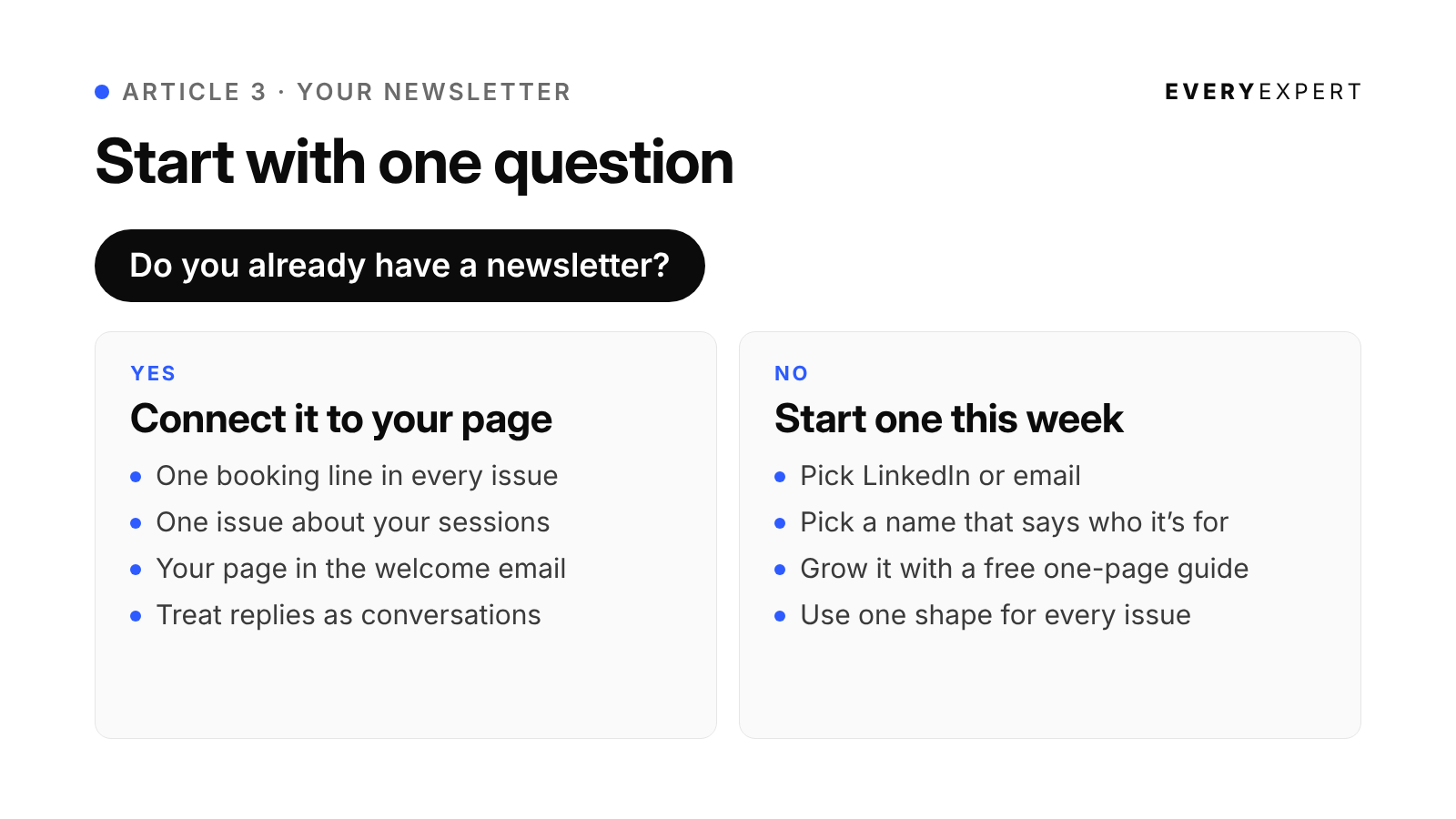
Do you already have a newsletter? Any list counts: an email list, a LinkedIn newsletter, even a group of past clients you email every few months.
Yes: read "If you already have a newsletter" just below. You don't need to start over. You need to connect what you already send to your EveryExpert page.
No: skip to "If you don't have a newsletter yet." You'll set one up this week, with no list required.
If you already have a newsletter
You've done the hard part. People already chose to hear from you. Now make sure every issue gives them an easy way to take the next step.
1. Add one line to every issue
Put your EveryExpert link in the same place in every issue, so readers learn where to find it. The end of the issue, or a P.S., works best. One calm line that names the problem you solve is enough:
Want to work through [the problem you solve] one-on-one?
I take sessions here: [your EveryExpert link]
Leave it in every issue, even the ones about something else. Readers don't need the link the week you send it. They need it the week their problem shows up, and it should be sitting right there.
2. Send one issue that introduces your sessions
Write one issue about the problem your sessions solve, and end it by explaining what a session with you covers. Frame it around the reader, not the platform. "Here's what we'd work on in an hour together" gives people a reason to click. "I joined EveryExpert" only tells them what you did.
Paste your EveryExpert profile here:
[paste profile]

Paste your voice rules from article 1 here:
[paste voice rules]

I already send a newsletter to [who reads it]. Write one issue,
400 to 600 words, that introduces the sessions on my EveryExpert
page. Open with a problem my readers would recognize, tell one
short story from my work that shows it (ask me for one if you
need it), explain what a session with me covers and who it's
for, and end with one link: [your EveryExpert link].

Frame everything around what the reader gets. Don't lead with
the platform. Give me five subject lines.

Use only what I've given you. If you need a detail I haven't
provided, ask me instead of inventing it.
3. Add your page to the welcome email
If new subscribers get an automatic first email, add a short line there about your sessions and the link. It reaches every new reader at the moment they're most interested in you, and you only have to write it once.
4. Treat replies as the start of a conversation
When someone replies to an issue with their own version of the problem, answer them personally. If it sounds like something a session would help with, say so and share your link. Replies are the warmest signal a newsletter produces, and they're easy to miss.
Once your page is connected, keep writing. The issue shape and prompts in the next section work for existing newsletters too.
If you don't have a newsletter yet
1. Pick the simplest place to start
You have two options, and neither is wrong.
A LinkedIn newsletter is the easiest start if you already have a network there. When you create one, LinkedIn lets you invite your connections and followers to subscribe, and subscribers can be notified when you publish new issues, depending on their settings. There's nothing to set up. An invitation isn't a subscriber, though, so treat it as a first push, not a finished audience.
An email newsletter means you own the list. If you ever leave a platform, your readers come with you. It takes a little more setup, since you'll need an email tool, and many offer free tiers for small lists. Setup is four steps: create an account, make a signup page with one field for an email address, add your EveryExpert link to the thank-you message people see after they sign up, and send your first issue to yourself to check it. Then personally invite past clients and people you've worked with. Only add people who've agreed to hear from you.
Many experts do both: publish on LinkedIn for reach, and invite their closest contacts to the email version. If you're unsure, start on LinkedIn this week and add email later.
2. Name it so the invitation does the work
If you start on LinkedIn, the launch invitation is your biggest single push. The name and description are almost all people see when deciding whether to subscribe. A clever name that needs explaining wastes that push.
A good newsletter name tells someone exactly who it's for or what they'll get. Plain beats clever. Compare a name like "Musings" with one like "The First-Year Manager" or "The Monthly Money Hour." The second two tell a reader in three words whether this is for them.
Your description should finish the job in one sentence: who it's for, what they'll get, and how often.
Paste your EveryExpert profile here:
[paste profile]

I help: [who you help, in your words]

I'm starting a newsletter for these people. The name and a
one-sentence description are what people see when they decide
whether to subscribe, so they need to say plainly what a reader
gets.

Give me 10 name options. No puns people have to decode, no
generic words like "insights" or "musings." Some should name the
reader, some should name the problem, some should name the
outcome. For the best three, write a description under 150
characters that says who it's for, what they'll get, and how
often. Remind me to search for existing newsletters with the
same name before I pick one.

Use only what I've given you. Don't invent stories, facts,
numbers, quotes or credentials. If something is missing, ask me.
3. Grow it with a free guide
A good way to grow a new list is to give people a reason to join. That's what a lead magnet does: a short, free guide someone gets in exchange for their email address.
Keep it small. A one-page PDF with a list of practical tips is plenty. Something like "Seven ways to prepare for a difficult conversation with your manager," or "Ten questions to ask before you sign a lease." You can make it in any document tool that exports to PDF. No design skills required.
Then use your posts to point people to it. Share one tip in full, make it genuinely useful, and invite readers to get the rest:
Here's one of the seven things I tell every client before a
difficult conversation with their manager:

[the tip, explained properly, three to five short lines]

The other six are in a free one-page guide. Get it here:
[link to your signup page]
The post gives real value on its own. The guide gives people a reason to join your list. And the list is where your newsletter does its work from then on.
The last line of the guide is the most important one. End it with your EveryExpert link: "If you'd like to work through this on your own situation, book a session with me here." A free guide that ends nowhere collects email addresses nobody acts on. A guide that ends at your booking page is the first step toward a paid call.
To collect email addresses, you'll need a simple signup page from an email tool. Many have free tiers and a basic page template. If you already have a newsletter, a free guide grows that list too.
Paste your EveryExpert profile here:
[paste profile]

I help: [who you help, in your words]

Help me create a one-page lead magnet: a free guide people get
in exchange for their email address. Give me five title ideas in
the format "[number] ways to [outcome my buyers want]" or
"[number] questions to ask before [decision my buyers face]."

For the title I pick, interview me one question at a time until
we have enough real material: the advice, checks and steps I
actually give clients. Don't supply the advice yourself. When I
say "finished," organize only my answers into the guide: a
one-line intro, the list items (one or two sentences each), and
a final line inviting readers to book [session name] with me at
[your EveryExpert link].

Then write a LinkedIn post that shares one item from the guide
in full and invites readers to download the rest.

Use only what I know and do. If you need a fact or example I
haven't given you, ask me instead of inventing it.
4. Use one shape for every issue
The shape is what makes a newsletter easy to write. Once you have it, each issue is filling in five blanks instead of starting from nothing.
Title: [the problem or the answer, in plain words]

[Open with the situation your reader is in. Two or three
sentences they'd recognize from their own week.]

[The story: one moment from your work that shows the problem.
A client conversation, a question someone asked, a mistake you
saw. Remove anything that identifies a client.]

[The idea: what you've learned, stated once, clearly.]

[The step: one thing they can do this week without you.
Specific enough to try today.]

[The link: "If you'd rather work through this with me, I take
sessions here: [your EveryExpert link]"]

[Optional P.S.: a question they can reply to.]
That's it. Four hundred to seven hundred words is plenty. One idea per issue, never three. If you have three ideas, you have three issues.
Your material comes from the work you did in article 1. If you've been feeding your AI tool notes from your client calls, every week of work produces a week of newsletter material. You're writing down what you already said to someone, for everyone who has the same problem.
Paste your EveryExpert profile here:
[paste profile]

Paste your voice rules from article 1 here:
[paste voice rules]

The idea for this issue: [one sentence]
A story that shows it: [rough notes, or paste call notes with
identifying details removed]
The step I want readers to take: [one sentence]

Write a newsletter issue, 400 to 600 words, using this shape:
open with the reader's situation, tell the story, state the idea
once, give the one step, and end with one line inviting them to
book with me at [your EveryExpert link]. Add a P.S. with a
question they can reply to. Give me five title options that name
the problem or the answer in plain words.

Use only what I've given you. If you need a detail I haven't
provided, ask me instead of inventing it.
5. Make the first issue useful, not an announcement
"Welcome to my newsletter" is the least interesting thing you'll ever send. Skip it. Your first issue should be your best idea, written in the shape above. Add one or two sentences at the top saying who the newsletter is for and how often it'll arrive, then get straight to the substance.
The first issue is the one that gets the most attention, especially on LinkedIn, where it's attached to the launch invitation. Treat it as your best sample, because that's what it is.
6. Pick a pace you can keep
Weekly is great if you can sustain it. Every two weeks works. Monthly works if each issue is genuinely useful. What doesn't work is weekly for a month and then silence for three. Pick the slowest schedule you're sure you can keep, and speed up later if you want to.
A simple rhythm: write the issue on the same day each week or fortnight, right after a client day, while the conversations are fresh.
7. Put your EveryExpert link in every issue
One link to your booking page per issue, near the end, after you've been useful. Not five links, not a banner at the top. The reader should finish the issue feeling helped, and then see a clear, calm way to get more help if they want it.
Also put your newsletter's subscribe link on your EveryExpert profile, in your LinkedIn featured section, and in your email signature. Every place someone finds you should offer a way to stay in touch.
How this looks in practice
These are illustrations of the pattern, not case studies.
A sleep consultant for new parents has a few hundred LinkedIn connections, mostly from a previous corporate career, and assumes none of them care. But plenty of them are new parents or will be. Her first LinkedIn edition, named for the exact problem, reaches all of them through the launch invitation. Colleagues who never knew what she does start getting a useful issue from her every other week, and it's easy for them to forward to friends who need it.
A supply chain consultant works with a small number of large clients and doesn't want a public audience. He starts an email newsletter and personally invites forty people: past clients, former colleagues and a few prospects. Each monthly issue covers one problem he saw that month, anonymized. It keeps him in front of exactly the people who send him work, with one link to book a session for anyone not ready for a full engagement.
A voice-over coach already sends a short weekly newsletter: one recording mistake, why it happens, and a thirty-second fix. Readers like it, and nobody books. She adds one line to the end of every issue pointing to her feedback session on EveryExpert, and sends one issue walking through what that session covers. Nothing else about the newsletter changes. The difference is that readers now know where to go when they want more than the free tip.
Do this today
If you already have a newsletter, add the one-line link to your next issue. That's five minutes. If you don't, run the naming prompt and pick a name and description. That's about fifteen minutes, and it's the decision that makes everything after it easier.
Bring it back
Post your newsletter name, or the line you added to your existing one, in the EveryExpert community and ask whether someone outside your field would know who it's for. If you can't decide between a LinkedIn newsletter and an email list, bring that question to office hours with who you're trying to reach, and the room at office hours can help you pick in a couple of minutes.
Next: Article 4: Turn one good idea into your next issue
Back to: The series hub