Your next issue is already in last week's calendar
You don't need new ideas every week. Your client conversations and best posts already hold the material. A weekly habit turns it into an issue in under an hour.
Article 4 of 11 · Route 1: Your newsletter
The situation
Your newsletter is up and running, or it's connected to your EveryExpert page. The first issue was easy, because you'd been saving that idea for a while. The second was fine. Now the third is due, and you're staring at a blank page wondering what's left to say.
Meanwhile, you spent the week answering questions, solving problems and explaining things to clients. None of it feels like newsletter material, because it's just your work.
The complication
This is where most newsletters quietly stop. The writer treats each issue as a creative assignment that needs a fresh idea, and fresh ideas run out. Or they reuse old material and feel like they're cheating, so they don't send anything at all.
The other problem is flying blind. You send issues, a few people reply, and you have no idea whether any of it is leading to bookings. Without that, it's hard to justify the hour.
The question
How do you produce an issue every week or two, in under an hour, from work you're already doing, and know whether it's working?
The answer
1. Keep a running idea list, and let your work fill it
The best newsletter ideas come from real moments. A question a client asked. Something you explained three times this week. A mistake you saw someone about to make. A reply to one of your posts that made you think.
Keep one running note on your phone and add to it whenever one of these happens. A single line is enough: "Client asked whether she should raise prices before or after the new offer." That line is a future issue.
Once a week, give your AI tool the raw material and let it find the ideas for you. The more real material you give it, the better the ideas get. Notes from your calls, transcripts from a meeting note-taker, emails where you explained something well, and questions from the community all count. If your note-taking tool connects directly to your AI tool, this step takes almost no effort.
Paste your EveryExpert profile here:
[paste profile]

Here's what happened in my work this week. Names and identifying
details are removed:
[paste call notes, transcripts, questions clients asked, emails
where you explained something, your running idea list]

Find three newsletter ideas in this material. For each one, give
me:
- the problem it addresses, in the words a reader would use
- the moment from my week that shows it, quoted or summarized
  from what I pasted
- the one step a reader could take without me
- a working title

Only use what's in the material. If an idea needs a detail I
didn't include, tell me what to add instead of inventing it.
Pick one. Save the other two for later issues. After a few weeks, you'll have more ideas waiting than issues to send.
2. Start from the idea that already got a reaction
If you post on LinkedIn or anywhere else, your best issue ideas are already tested. The post that got real replies, where people described their own version of the problem, is telling you what your readers care about.
Take that post and expand it. Add the part you had to cut for length. Answer one question from the comments. Add the step. The post was the short version, and the issue is the full one.
Paste your voice rules from article 1 here:
[paste voice rules]

Here's a post that got real replies:
[paste post]

Here are the most useful comments:
[paste comments, with names removed]

Expand this into a newsletter issue, 500 to 700 words. Open with
the reader's situation, tell the story fully (ask me for the
details I cut), state the idea once, answer one reader question
from the comments, give one step they can take this week without
me, and end with one link: "If you'd rather work through this
with me, I take sessions here: [your EveryExpert link]". Give me
five title options.

Use only what I've given you. Don't invent stories, facts,
numbers, quotes or credentials. If something is missing, ask me.
3. Cut every issue back into posts
It works in the other direction too. One good issue can become two or three short posts, each carrying one piece of it: the story, the idea, or the step. Each post points to the full issue or your newsletter signup, and your newsletter points to your EveryExpert page.
That's how one idea a week keeps both your newsletter and your social media going, without doubling the work.
Here's my latest newsletter issue:
[paste issue]

Cut it into three short LinkedIn posts, under 150 words each. One
tells the story, one states the idea, one gives the step. Each
should stand on its own and be useful without the issue. End each
with a short line inviting readers to subscribe for the full
version: [your newsletter link]. Use only what's in the issue.

Use only what I've given you. Don't invent stories, facts,
numbers, quotes or credentials. If something is missing, ask me.
4. Know which issues lead to bookings
You don't need a dashboard. You need three simple habits.
Use a different link in each place. A free link shortener lets you create a separate short link for your newsletter, your LinkedIn posts and your email signature, all pointing to the same EveryExpert page. Each one counts its own clicks, so you can see which place sends people to your page. A click isn't a booking, though, which is what the next two habits are for.
Notice what gets replies. Replies are one of the most useful signals a newsletter gives you. Keep a note of which issues got them and what people said. After a few months, a pattern appears: the topics that get replies are the ones to write about more often.
Ask new clients how they found you. One question at the start of every first session: "What made you book?" It takes ten seconds, and it tells you what clicks can't. If three clients in a row mention your newsletter, you know the hour is worth it.
5. Keep a simple booking scoreboard
Once a week, write down five numbers: people you reached (subscribers, post views or workshop attendees), clicks to your page, paid sessions booked, sessions completed, and reviews received. A notebook works. So does a spreadsheet.
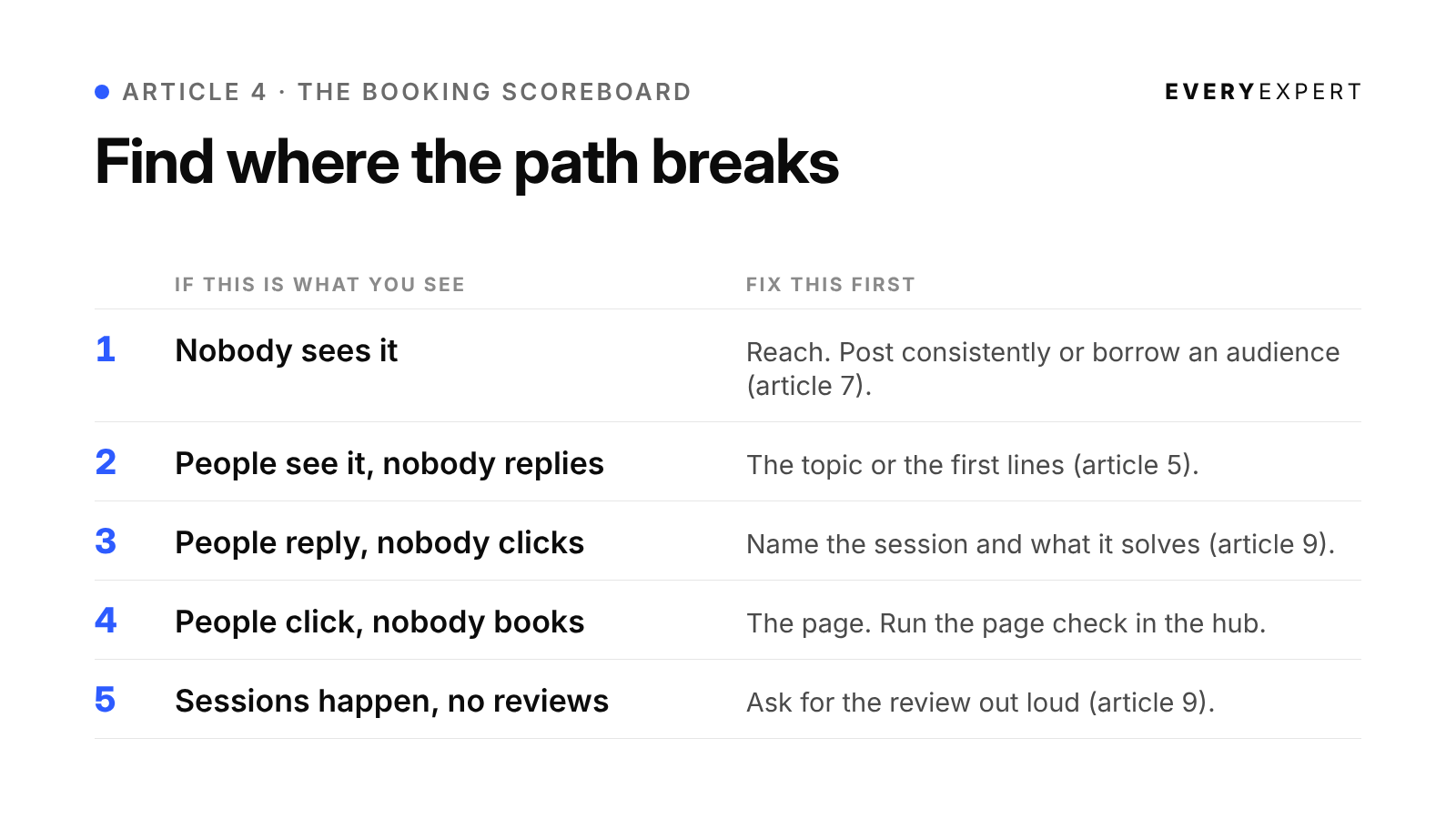
Then look for where the path breaks:
Nobody sees it: reach is the problem. Post more consistently, or borrow an audience (article 7).
People see it, nobody replies: the topic or first lines need work (article 5).
People reply, nobody clicks: the next step isn't clear. Name the session and what it solves (article 9).
People click, nobody books: the page is the problem. Run the page check in the hub.
Sessions happen, no reviews: you're not asking out loud (article 9).
Fix one stage at a time, starting with the earliest one that's broken.
Tasha's version. Every Friday, Tasha pastes the week's call notes, names removed, into the weekly idea prompt. One week gives her three issues: why new managers hold on to the work they're best at, the one-on-one question that surfaces problems early, and what to say in your first team meeting as the new manager. She cuts each issue into two short posts, and uses a separate short link in her newsletter so she can see which place actually sends people to her page.
How this looks in practice
These are illustrations of the pattern, not case studies.
A restaurant operations consultant assumes her week is too routine to write about. The weekly prompt finds three ideas in her call notes, including an owner who didn't know his food cost had crept up for six months. That one becomes an issue with a single step: check one invoice against last quarter's. The other two ideas wait in her list for the next two weeks.
A nonprofit board coach posts about why new board members stop showing up after six months. The replies are full of executive directors describing the same thing. He expands the post into an issue, answers the most common question from the comments, and ends with his link. It's the easiest issue he's written, because his readers told him what to say.
A pricing coach for small businesses isn't sure her newsletter does anything. She sets up separate short links for her newsletter and her LinkedIn posts, and starts asking new clients how they found her. Within a couple of months she can see which of the two sends more people to her page, and she spends her time accordingly.
Do this today
Paste last week's call notes, or your running idea list, into the weekly prompt. That's about fifteen minutes. Pick one of the three ideas it finds, and that's your next issue, with one more chance for a reader to book.
Bring it back
Post the three ideas the prompt found in the EveryExpert community and ask which one other experts would read first. If you're stuck because your week feels too ordinary to write about, bring your notes to office hours. Someone else will spot the issue hiding in them faster than you will.
Next: Article 5: Five LinkedIn post shapes, and the first two lines
Back to: The series hub