Teach first, invite last: how to run a workshop people remember
A good workshop teaches one thing properly, shows it working on a real example, and leaves time for questions. Do that, and the invitation to book feels like the natural next step.
Article 8 of 11 · Route 3: Events for other communities
The situation
An organizer said yes, or you've decided to host a workshop for your own audience: your newsletter readers, your LinkedIn followers, your past clients. Either way, you have a date, a time and a room full of people who are exactly your buyers. Now you have to build the workshop.
The instinct is to put everything you know into it. Forty slides, your full method, every tip you've collected. You want the audience to see how much you know.
The complication
That instinct produces the most forgettable kind of workshop. When you teach everything, people remember nothing, and a room that's been lectured for forty minutes has no energy left for questions. The organizer thanks you politely, and nobody books.
The opposite mistake is just as common: a workshop that's really a sales pitch with a few tips attached. Audiences can tell within five minutes, the organizer regrets inviting you, and you don't get invited back.
The question
How do you run a workshop that's genuinely useful to the audience, makes the organizer glad they invited you, and leads the right people to book with you afterward?
The answer
1. Teach one thing, properly
Pick one problem your audience has and solve it completely. Not an overview of your field. One problem, one method, one result they can take home. If you've named your framework (article 2), teach one stage of it well rather than all of it quickly.
A good test: can you finish the sentence "By the end of this workshop, you'll be able to..." with something specific? "Understand retirement planning" fails. "Choose between your two retirement plan options" passes.
2. Start from an example template, then make it yours
There's no single right way to structure a workshop. Your length, format and pacing depend on your audience, your topic and how you like to teach. Here's an example template for a 45-minute workshop that many experts find a useful starting point. Adapt it freely.
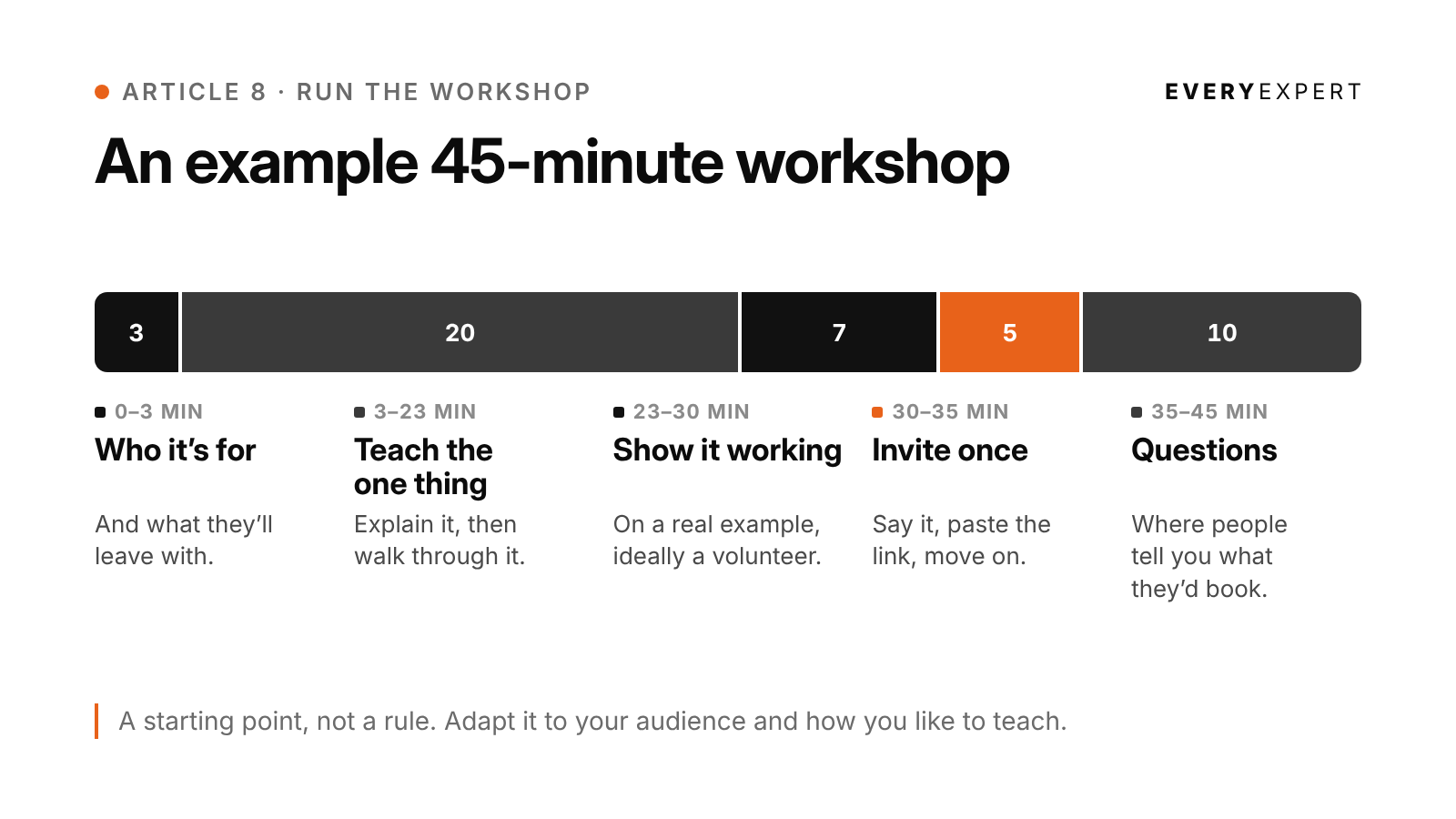
0 to 3 minutes: who this is for and what they'll leave with.
One line about you. Skip the life story.

3 to 23 minutes: teach the one thing. Explain it, then walk
through it step by step.

23 to 30 minutes: show it working. Run it live on a real
example, ideally a volunteer from the audience.

30 to 35 minutes: invite once. Tell people where to book if
they want help applying this to their own situation. Paste
the link in the chat as you say it, then move on. (Article 9
covers exactly how.)

35 to 45 minutes: questions. This is where people tell you
exactly what they'd book.
Example: the template, adapted for one workshop
Workshop: "Your first retirement decision, in plain English," for a new teachers' group.
0 to 3: "This is for anyone in their first three years of teaching who hasn't picked a retirement plan, or picked one and isn't sure why. By the end, you'll know the three questions that usually decide between the two options, and what to ask HR before you sign." One line: "I'm a financial planner who works only with teachers."
3 to 23: The two plan options side by side. The three questions that decide which fits: how long you expect to stay, whether you might move states, and what your district contributes. What each answer points to.
23 to 30: A volunteer shares their situation, with no personal numbers needed. Walk through the three questions live and show how the answers point toward one option or the other.
30 to 35: "If you'd like to work through this on your own situation, I do one-hour planning sessions for teachers, and the link is in the chat. That's the only time I'll mention it."
35 to 45: Questions.
Your AI tool can help you adapt the template to your own situation. Tell it who's in the room, how long you have, and how you like to teach, and ask it to suggest a structure rather than forcing yours into the example.
Paste your EveryExpert profile here:
[paste profile]

The audience: [who's in the room, and whether it's my own
audience or someone else's community]
How long I have: [length]
How I like to teach: [e.g. lots of discussion, mostly
demonstration, slides or no slides]
The one thing they should leave able to do: [one sentence]
My framework, if relevant: [paste it]

Here's an example template I'm starting from: a short opening on
who it's for, a teaching section, a live example, one brief
invitation to book with me at [your EveryExpert link], and time
for questions. Treat it as a starting point, not a rule.

Suggest the structure that fits my audience, length and teaching
style, and explain why. Then give me the outline: section
titles, what I say in each, a live example I can run, and three
questions to prompt the room if it goes quiet.

Use only what I've given you. Don't invent stories, facts,
numbers, quotes or credentials. If something is missing, ask me.
3. Show it working
The live example is the part people remember. It's also the part that sells your workshop better than anything you could say about yourself, because the audience watches you do the work.
Ask for a volunteer, or prepare an anonymized example from a real client if you're worried nobody will speak up. Keep it respectful: never ask anyone to share something they'd be uncomfortable saying in front of the group.
Example: asking for a volunteer
"I'd love to run this on a real situation. Is anyone willing to share theirs? You don't need to give any personal numbers. Just tell me roughly how long you're planning to teach and whether you might move."
4. Make promotion easy
If you're teaching for someone else's community, send the organizer a promo kit as soon as the date is confirmed. Organizers are busy, and the easier you make promotion, the more people show up. If it's your own event, you're the organizer, and the same kit becomes your promotion plan for your newsletter, your posts and your personal invitations.
A good promo kit includes:
A two-sentence description of the workshop
A short post they can share on social media
A brief email for their list or group
A reminder message for the day of the workshop
The text for a simple square promo image: the title and one line
Example: the two-sentence description
"New to teaching and not sure which retirement plan to pick? In 45 minutes, you'll learn the three questions that decide which option fits you, and the one thing to ask HR before you sign."
Example: the post for the organizer to share
"Picking a retirement plan in your first years of teaching is one of those decisions nobody explains properly. So we asked someone who does. Join us Tuesday the 14th at 7pm Eastern for a free 45-minute workshop: 'Your first retirement decision, in plain English.' Register here: [link]"
My workshop: [title, date, time, how to register]
The community: [name, or "my own audience"]
Paste your EveryExpert profile here:
[paste profile]

Write a promo kit that can be used as-is, by the organizer or by
me if it's my own event: a two-sentence workshop description, a
social media post, a short email for the list, a reminder message
for the day of, and the text for a square promo image (title
plus one line). Write it around what attendees get. No mention of
my paid services.

Use only what I've given you. Don't invent stories, facts,
numbers, quotes or credentials. If something is missing, ask me.
5. Promote on a sensible timeline
How much promotion you need depends on whose room it is.
If you're teaching for someone else's community, the organizer already has the audience. Give them the description and a post they can paste. One announcement, then a reminder the day before, is usually enough.
If it's your own event, give people more notice. Announce it a few weeks out, invite your list again a week before, and send a reminder the day before and the morning of.
Plan for the replay either way. Some people who register won't make it live, so the follow-up email in article 9 is how they'll hear what you taught, and where to book.
6. Treat the questions as research
The last ten minutes are the most valuable part of the workshop for you. The questions people ask show you which problems they care about most, in their own words. They're clues rather than orders: questions that come up again and again are worth building posts and workshops around, and a booking is what tells you someone will pay.
Write them down, or ask the organizer if you can have the chat log. Each question is a future post (article 5), a future newsletter issue (article 4), and a sign of what your next workshop should cover.
If someone asks a question that's really about their specific situation, answer the general part, then say: "The rest depends on your details, which is what my sessions are for. The link is in the chat." That's an honest answer, and audiences hear it that way.
7. Run a quick check before you start
Nothing undermines a good workshop like ten minutes of technical trouble. Log in fifteen minutes early and check:
Your audio, camera and lighting
Screen sharing, with notifications turned off
That the recording is on, if you agreed to record, and that you'll tell attendees at the start
That your EveryExpert link is ready to paste into the chat
That you know who's hosting, who's admitting people, and who's watching the chat
Tasha's version. Tasha teaches with more discussion than slides, so she adapts the template. A short opening. The Handoff Method, one stage at a time. A live example where a volunteer lists what they did last week and the group sorts it into "mine" and "my team's." One sentence inviting people to book. Then a long question period, which she writes down in full because it becomes next month's posts.
How this looks in practice
These are illustrations of the pattern, not case studies.
A family business succession advisor is invited to speak at a regional business owners' association. Her first draft has thirty-two slides covering every part of succession planning. She cuts it to one question, "Who takes over, and when do you tell them?", and runs the live example with a volunteer who owns a hardware store. When the questions run over time, she writes them down, and several turn out to be almost word for word the problem her paid session solves.
A first-time homebuyer coach is hosting a workshop for his own newsletter readers and worries about asking for a volunteer, so he prepares an anonymized example from a past client instead: a couple deciding between renting another year and buying now. He walks through it live, number by number, and invites the audience to shout out what they'd do. The room does the work with him, which is exactly what makes it memorable.
A public relations consultant sends her organizer a complete promo kit the same day the workshop is confirmed. The organizer can use the post, the email and the reminder word for word, with no editing. Nothing about the workshop itself changes, but the organizer's job gets much easier, and that's what gets a speaker invited back.
Do this today
If you have a workshop booked, run the outline prompt and draft your first three minutes. That's about fifteen minutes. If you don't have one yet, write the sentence "By the end of this workshop, you'll be able to..." for the workshop you'd most like to teach. That sentence will make your next pitch much stronger.
Bring it back
Share your "By the end of this workshop, you'll be able to..." sentence in the EveryExpert community and ask whether it's specific enough. After your first workshop, bring the questions people asked to office hours. The room can help you turn them into your next month of posts.
Next: Article 9: The ask at the end, and the follow-up
Back to: The series hub